
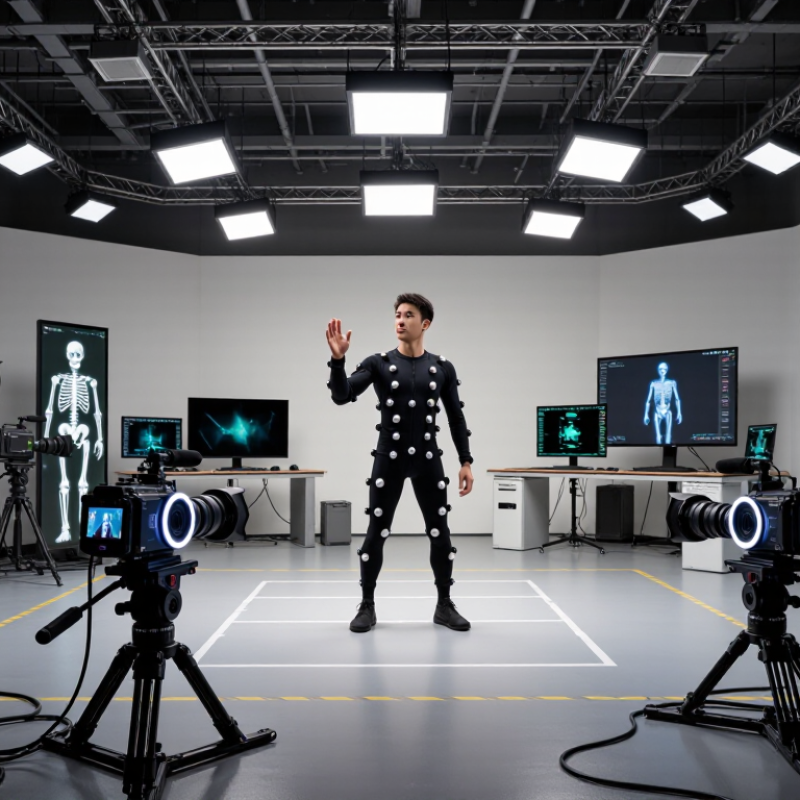
A Motion Capture Program records a performer’s movement and turns it into digital data for a character or object. In a studio, an actor might wear a fitted suit covered with small reflective markers. Cameras track those markers as the actor walks, turns, or raises a hand. The software then maps the recorded motion onto a digital skeleton. The result can make a virtual character move with human timing, rather than following only hand-keyed poses. That is the basic idea.
John Lasseter, an animator and filmmaker, observed, “The art challenges the technology, and the technology inspires the art.” His words fit motion capture well: accurate tracking matters, but so does the performance and the creative work that follows. A capture session may look simple on screen, yet it involves calibration, camera placement, and careful data cleanup. Animators often adjust the result to suit a character’s proportions or the scene’s needs. Small errors can show up as sliding feet, stiff shoulders, or markers the cameras lose from view. It is not magic. Nor does a clean data file guarantee a convincing performance. Understanding how a Motion Capture Program works helps readers judge what it can do, where human skill remains essential, and why the final image may differ from the recorded movement.
A motion capture program records changing three-dimensional positions, rather than one frozen pose. Each sample can describe a joint, marker, or tracked body segment in space. At 60 samples per second, a wrist may trace a smooth arc across the screen. Small shifts matter. Across time, the samples reveal speed, direction, pauses, and timing. That sequence is the motion.
During a walk, the program can track hip rotation, knee bend, and foot placement. It can also mark when each shoe meets the floor. Data is stored as coordinates linked to time, creating a motion path for frame-by-frame review. Analysts can compare two takes, spot an uneven landing, or check whether a gesture starts earlier than expected. Numbers need context.
The software does not capture movement perfectly. Camera angles, loose markers, blocked views, or hurried calibration can distort a joint path. A model may show a smooth elbow curve even when the arm briefly slipped behind the torso. That mismatch deserves attention. Sound interpretation considers the 3D track alongside the recording setup, the task, and the performer’s actual movement. Even careful data can leave details uncertain.
What Is a Motion Capture Program and How Does It Work?
How Cameras and Sensors Track Markers in 3D Space
A motion capture program turns marker movement into a digital skeleton. Several calibrated cameras record reflective or illuminated markers from different angles. Software matches each marker across camera views, then triangulates its position in three-dimensional space. Small markers matter. A loose marker or blocked view can create gaps or mistaken tracks. The system may estimate missing points, but those estimates are not measured data.
Wearable sensors add another route. Accelerometers and gyroscopes record movement and rotation, while software combines their readings to estimate body pose. Optical cameras give clear spatial detail, but people or props can hide markers. Wearable sensors avoid some occlusion, yet their position estimates may drift. In practice, clean calibration and careful marker placement often matter more than adding extra software. It is not magic; even a tidy setup can need correction.
A 2023 Grand View Research market report estimated the global motion-capture market at $190.4 million in 2022, reflecting its use across film, games, and movement research. That figure describes the market, not tracking accuracy.
Tips: Calibrate cameras before recording. Keep markers visible, label them consistently, and inspect gaps before trusting the finished motion.
A motion capture program converts movement into digital measurements, then uses them to animate or analyze a body. Six degrees of freedom, or 6-DoF, describe an object’s full pose: its position and orientation in space. Three values track position along the X, Y, and Z axes. Three more describe rotation, often called yaw, pitch, and roll. Together, they can show a performer stepping forward, leaning, and turning their head.
Each frame records these values relative to a defined coordinate system. Software links frames over time, creating a motion path rather than a single snapshot. For example, a wrist marker may move 20 centimeters while its orientation changes as the hand turns palm-up. That rotation matters: position alone cannot distinguish an open hand from a turned one. Cameras or sensors estimate pose, and calibration aligns the measurements with the scene or character rig. Coordinate conventions differ, so identical numbers may not represent identical movement across setups.
Tips: Calibrate with the subject standing in a clear, neutral pose. Check axis labels and units before retargeting. Review a few frames manually; a smooth curve can still hide a drifting wrist or swapped rotation axis. Clean data helps, but sometimes it can make movement look less natural.
A motion-capture program turns camera images or sensor readings into a moving digital skeleton. The raw data is rarely clean. Markers may disappear behind an arm, and sensor readings can drift. Small gaps matter. Software identifies each marker or sensor, removes obvious spikes, and estimates missing positions from nearby frames. Filtering reduces jitter, but too much smoothing can make a quick turn look sluggish. The choice is not purely technical; an animator may need to review the result frame by frame.
Next, the solver estimates joint positions and rotations from the cleaned signals. It uses calibration and biomechanical constraints to keep elbows bending plausibly and feet near the floor. Then retargeting maps that motion onto a character’s different proportions. A 2024 Grand View Research market report estimated the global motion-capture market at $220.6 million in 2023, reflecting broad use across media, healthcare, and other fields. That figure measures the market, not tracking accuracy. The distinction matters. A convincing skeleton can still contain errors, especially during contact, fast movement, or occlusion. When software fills in missing motion, its guess should be checked against the original footage and the task’s needs.
A motion capture program records a performer’s movement as timed data, but that data is not yet a finished film performance. Before animation, technicians check camera coverage, align the recorded takes, and solve tracked markers into a moving skeleton. A heel slipping behind a prop can leave a gap in the track. Even a brief gap may bend the character’s foot.
Capture rates and delivery rates are different. A system may record many samples per second, while the final film plays at 24 frames per second. The team maps motion to that timeline, preserving the performer’s timing where possible. If frames are simply dropped, a quick hand gesture can look uneven. Interpolation can smooth movement, but it may also soften a sharp stop. There is no automatic fix for every take.
Cleanup removes stray marker jumps and reduces jitter without erasing the performer’s weight shifts. Then the solved skeleton is retargeted to the animated character, whose proportions may differ from the actor’s. Animators adjust foot contact, hand placement, and facial timing, often checking the result frame by frame. Small details matter. A shoe that slides two inches across a floor can break the illusion. The process is precise, though not perfectly objective: smoothing a motion can make it cleaner and less human.
It records changing 3D positions over time, not just one frozen pose. A wrist can trace a smooth arc across several frames.
It describes position and orientation. Three values track movement along the X, Y, and Z axes; three describe rotation.
Position alone may show where a hand is, but not whether its palm faces up or down. Small turns can change the motion’s meaning.
It can track hip rotation, knee bends, and foot placement. It may also mark when each shoe touches the floor.
It can remove sudden spikes and estimate gaps when markers disappear behind an arm. Too much smoothing may make a quick turn look sluggish.
A solver estimates joint positions and rotations, then retargeting adapts them to a character’s proportions. The result can still contain errors.
Camera angles, loose markers, blocked views, and rushed calibration can distort movement. Even a smooth elbow curve may hide a tracking slip.
Confirm the axis labels and units, then review a few frames manually. Compare the track with the original footage and the performer’s task.
Yes. A polished curve may conceal a drifting wrist or guessed movement. Numbers need context. Sometimes the uncertainty remains.
A Motion Capture Program records how a person or object moves through three-dimensional space over time. Cameras and sensors observe reflective markers or other tracking points, then use their positions to calculate movement in 3D. By following these points across successive moments, the system can capture both where a subject is and how it turns.
The resulting data often describes six degrees of freedom: position along three axes and rotation around those axes. Software then checks and cleans the measurements, fills or corrects gaps where possible, and solves the motion into a usable animation. The movement can be mapped onto a digital skeleton so it drives a character or model. Finally, the captured motion is reviewed and prepared to fit a 24-frames-per-second film or animation workflow, helping the finished movement play smoothly and consistently.